
This comprehensive guide details the process of acquiring and utilizing creator codes within the soccer simulation game, Goals, to unlock various in-game rewards. It outlines a current list of active codes, explains the limitations on their redemption, and provides clear, sequential instructions on how players can successfully claim their free items through the game's official website.
The article also addresses a key restriction: players can only redeem a maximum of five codes at present. This measure, seemingly implemented to regulate player progression, is a crucial piece of information for anyone looking to optimize their in-game experience. Despite this limitation, the guide emphasizes the value these codes offer in building a stronger squad, encouraging players to take advantage of every available opportunity to enhance their gameplay.
Goals Creator Codes: Unlock Your In-Game Advantages
In the popular free-to-play soccer game, Goals, creator codes serve as valuable keys to unlocking a variety of complimentary in-game items. While these rewards primarily consist of lower-tier packs, they are nonetheless instrumental in accelerating your squad-building efforts. In a game where strategic team development is paramount, every bonus item contributes significantly to strengthening your roster and enhancing your competitive edge. This section provides a comprehensive list of all currently active creator codes, enabling players to immediately identify and utilize these beneficial resources. Understanding the strategic advantage these codes offer is crucial for any player aiming to optimize their progression and achieve success on the virtual pitch.
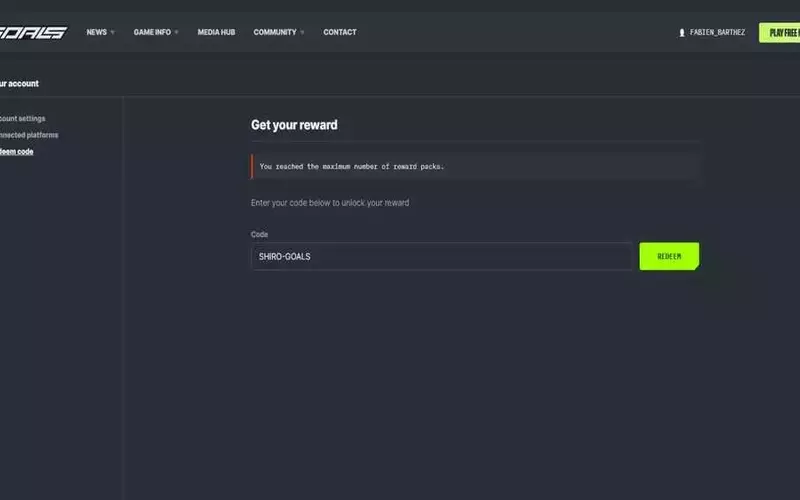
Currently, a selection of active creator codes is available for Goals players to redeem, offering various in-game benefits. These codes include: LAKTA-GOALS, NICKT-GOALS, PESH1-GOALS, PINTO-GOALS, CHIGR-GOALS, MANUU-GOALS, AUZIO-GOALS, VERSE-GOALS, JOLIV-GOALS, SHIRO-GOALS, KATAN-GOALS, and UMIDI-GOALS. However, it's important for players to note a significant restriction: only five codes can be redeemed at this time. Attempting to redeem more than this limit will result in an error message indicating that the maximum number of reward packs has been reached. This limitation appears to be a design choice aimed at moderating player progression, though there is a possibility that this restriction may be lifted in future updates as the game evolves. Players should strategically choose which codes to redeem to maximize their immediate benefits within the existing constraints.
Step-by-Step Guide: Redeeming Goals Creator Codes
To successfully redeem creator codes in Goals and claim your free in-game rewards, it's essential to follow a specific procedure conducted through the game's official website, rather than attempting redemption within the game itself. This detailed guide outlines each necessary step, ensuring that players can effortlessly navigate the process and acquire their well-deserved items. From accessing the correct web portal to confirming account connections and locating the redemption option, every stage is clarified to prevent any potential difficulties. By adhering to these instructions, players can efficiently add new resources to their inventory, thereby boosting their progress and enjoyment in the game.
The process of redeeming creator codes for Goals is straightforward and must be completed through the official Goals website. Begin by visiting playgoals.com. Once on the website, sign in using the same platform credentials you use to play the game, ensuring a seamless connection between your game account and the website. Follow any on-screen prompts to confirm that your accounts are successfully linked. Next, locate the dropdown menu associated with your username on the website and select the “settings” option. Within the settings interface, navigate to the third option on the left-hand side, which will be labeled “redeem code.” Here, you can input any of the active creator codes provided to claim your rewards. Upon returning to the game, your newly acquired items should be waiting for you in the in-game store, ready to enhance your squad and gameplay experience.